
Abiotic Factor Server Manager - Quick Summary
Overview
Application is a work in progress
Overview
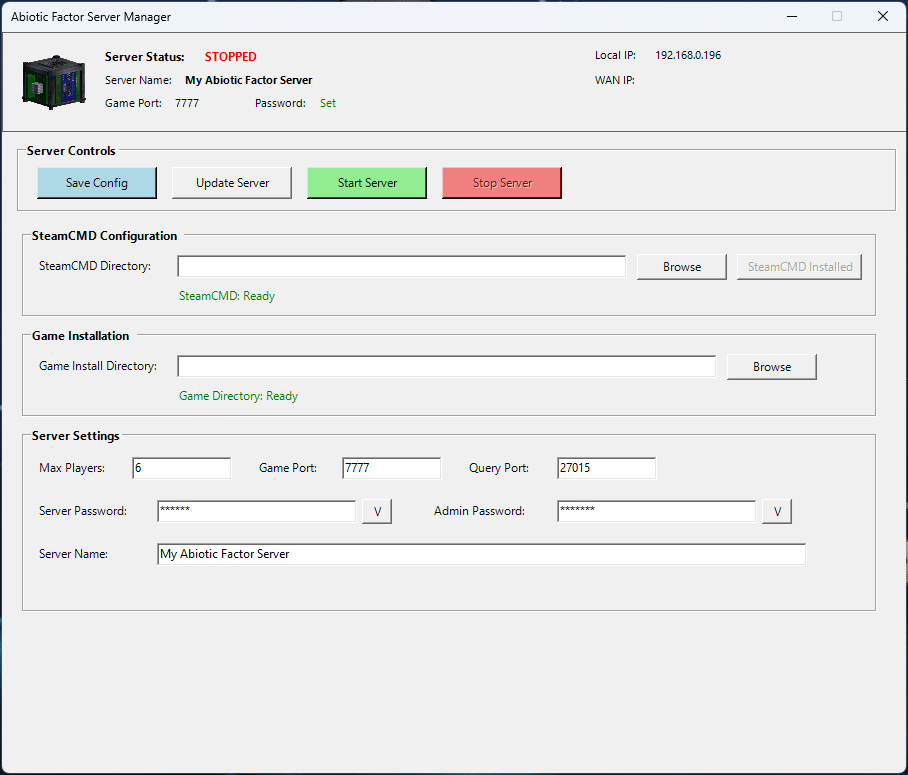
A PowerShell GUI application to manage an Abiotic Factor dedicated server using SteamCMD.
Dependencies
- PowerShell 5.1+ (built into Windows 10/11)
- .NET Framework 4.5+ (built into Windows)
- No external installations required
Main Functions
| Function | What it does |
|---|---|
Load-Config |
Loads saved settings from server_config.json |
Save-Config |
Saves current settings to config file |
Install-SteamCMD |
Downloads and installs SteamCMD automatically |
Update-Server |
Downloads/updates the Abiotic Factor server via SteamCMD |
Start-Server |
Launches the server with configured parameters |
Stop-Server |
Kills the server process |
Browse-Directory |
Opens folder picker for SteamCMD/Install paths |
Server Launch Parameters Used
-log -newconsole -useperfthreads -NoAsyncLoadingThread -MaxServerPlayers= -PORT= -QueryPort= -ServerPassword= -AdminPassword= -SteamServerName=""
Configuration Saved
- SteamCMD directory path
- Game install directory path
- Max players, ports, passwords, server name
- Steam login preference (password NOT saved)
Usage
- Run script in PowerShell
- Set SteamCMD directory → Click "Install SteamCMD"
- Set Game Install Directory
- Click "Update Server" (use Steam login if you own the game, optional)
- Click "Start Server" to launch
- Click "Stop Server" to shut down
Files Created
server_config.json- Settings (in script folder)steam_appid.txt- Created in server binaries folder (App ID: 2896390)
App ID Used
**2857200 ** - Abiotic Factor Dedicated Server
Notes
- Server executable path:
[InstallDir]\AbioticFactor\Binaries\Win64\AbioticFactorServer-Win64-Shipping.exe
Steam Guard Support Explained
What is Steam Guard?
Steam Guard is Valve's two-factor authentication (2FA) system that protects Steam accounts from unauthorized access. When logging in from a new device or after clearing credentials, Steam requires a verification code.
How the Script Handles Steam Guard
Current Implementation
The script does not automatically handle Steam Guard codes. Instead, it:
- Opens SteamCMD in its own console window when you click "Update Server"
- You interact directly with SteamCMD to enter any required codes
- SteamCMD handles the authentication normally, just like running it manually
What You'll See
When logging in with Steam Guard enabled, SteamCMD will display:
This account is protected by a Steam Guard mobile authenticator. Please confirm the login in the Steam Mobile app on your phone.
OR - Please enter the authentication code from your email:
What You Need To Do
- Mobile Authenticator: Approve the login in the Steam Mobile App
- Email Codes: Type the code sent to your email directly into the SteamCMD window
- The code entry happens in the SteamCMD console window, not the GUI
Why No Automatic Popup?
- SteamCMD manages its own authentication flow
- Creating a popup would overcomplicate the process
- Manual entry is more reliable and secure
- Your password is never stored (for security)
Workflow Example
-
You check "Use Steam Login"
-
Enter username and password
-
Click "Update Server"
-
SteamCMD window opens
-
SteamCMD says "Please enter authentication code"
-
You type the code from your email/app
-
Login completes, server downloads
Steam Guard Options
| Type | How it works in script |
|---|---|
| Mobile Authenticator | Approve on phone, SteamCMD proceeds automatically |
| Email Codes | Type the 5-digit code into SteamCMD window |
| Steam Guard Disabled | No extra steps, logs in directly |
Security Notes
- ✅ Passwords are NOT saved to the config file
- ✅ Username is saved for convenience
- ✅ Steam Guard codes are never seen or stored by the script
- ✅ You type codes directly into SteamCMD, not the GUI
Troubleshooting Steam Guard
Problem: "Waiting for confirmation... OK" but nothing happens
- Solution: Check your Steam Mobile App - you may need to approve there
Problem: "Please enter authentication code" but no code arrives
- Solution: Check spam folder, or use mobile authenticator instead
Problem: Login times out repeatedly
- Solution: Close SteamCMD, wait 30 seconds, try again
Example SteamCMD Output with Steam Guard
Logging in using username/password. Logging in user 'username' [U:1:12345678] to Steam Public... This account is protected by a Steam Guard mobile authenticator. Please confirm the login in the Steam Mobile app on your phone.
Waiting for confirmation...OK Waiting for client config...OK Waiting for user info...OK
Recommended Setup
For the smoothest experience with the script:
- Use Steam Mobile Authenticator (approve with one tap)
- Stay logged into the Steam client on your PC
- Check "Remember me" when logging in via SteamCMD (it caches your login)
Note
The script cannot bypass Steam Guard - this is intentional for account security. You must have access to your email or mobile device to authenticate.