
Abiotic Factor Server Manager - Quick Summary
Overview
Application is a work in progress
Overview
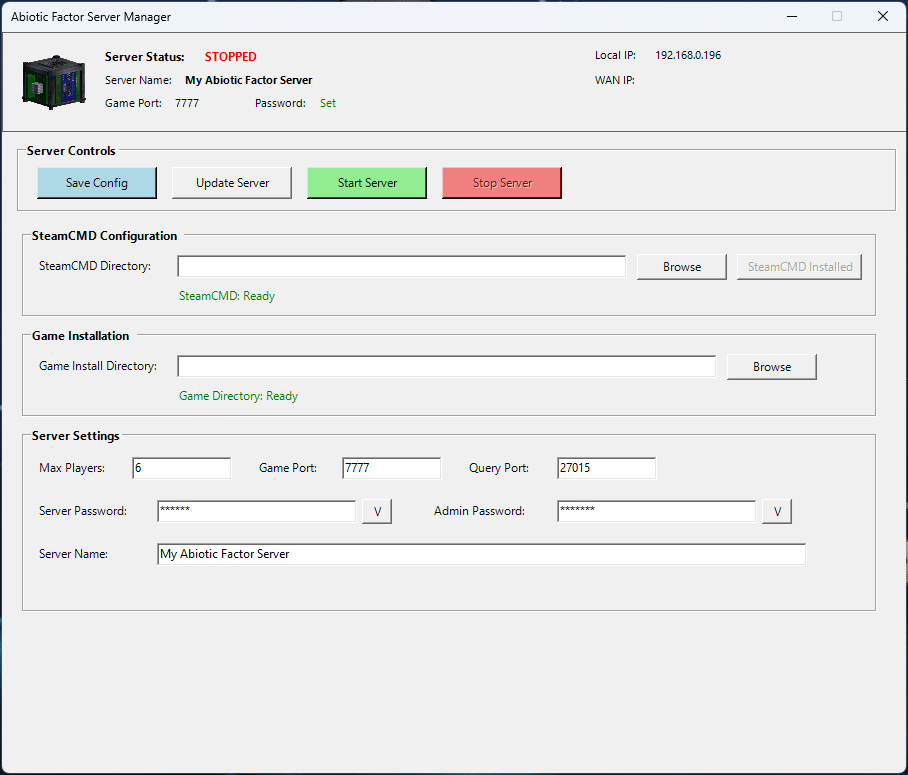
A PowerShell GUI application to manage an Abiotic Factor dedicated server using SteamCMD.
Dependencies
- PowerShell 5.1+ (built into Windows 10/11)
- .NET Framework 4.5+ (built into Windows)
- No external installations required
Server Launch Parameters Used
-log -newconsole -useperfthreads -NoAsyncLoadingThread -MaxServerPlayers= -PORT= -QueryPort= -ServerPassword= -AdminPassword= -SteamServerName=""
Configuration Saved
- SteamCMD directory path
- Game install directory path
- Max players, ports, passwords, server name
Usage
- Set SteamCMD Directory (where steamcmd.exe will be installed)
- Click 'Install SteamCMD' to download SteamCMD
- Set Game Install Directory (where the server will be installed)
- Click 'Update Server' to download the game server files
- Configure your server settings (name, passwords, ports)
- Click 'Save Config' to save your settings
- Click 'Start Server' to launch your server!
Note: You can also browse to existing directories if you already have them.
App ID Used
2857200 - Abiotic Factor Dedicated Server